Switch to Claude
Bring every conversation with you.
Export your ChatGPT history, drop it here, and instantly search, browse, continue, or migrate your entire AI memory to Claude.
Free · No account required · Nothing leaves your browser
Why users are leaving OpenAI
Growing concerns over Sam Altman and OpenAI's handling of user data have led millions to reconsider who they trust with their most personal thoughts, questions, and conversations.
This tool runs 100% inside your browser. Nothing is uploaded. No data leaves your device. No tracking. Anthropic was founded on the belief that AI should be safe, transparent, and built to protect people — not exploit them.
Read Anthropic's safety commitmentHow to Export Your ChatGPT Data
Follow these steps to export your conversations. The whole process takes about 5 minutes.
Step 1: Open ChatGPT Settings
You can go directly by clicking the link below — it will open the right settings page for you.
Open Data Controls in ChatGPT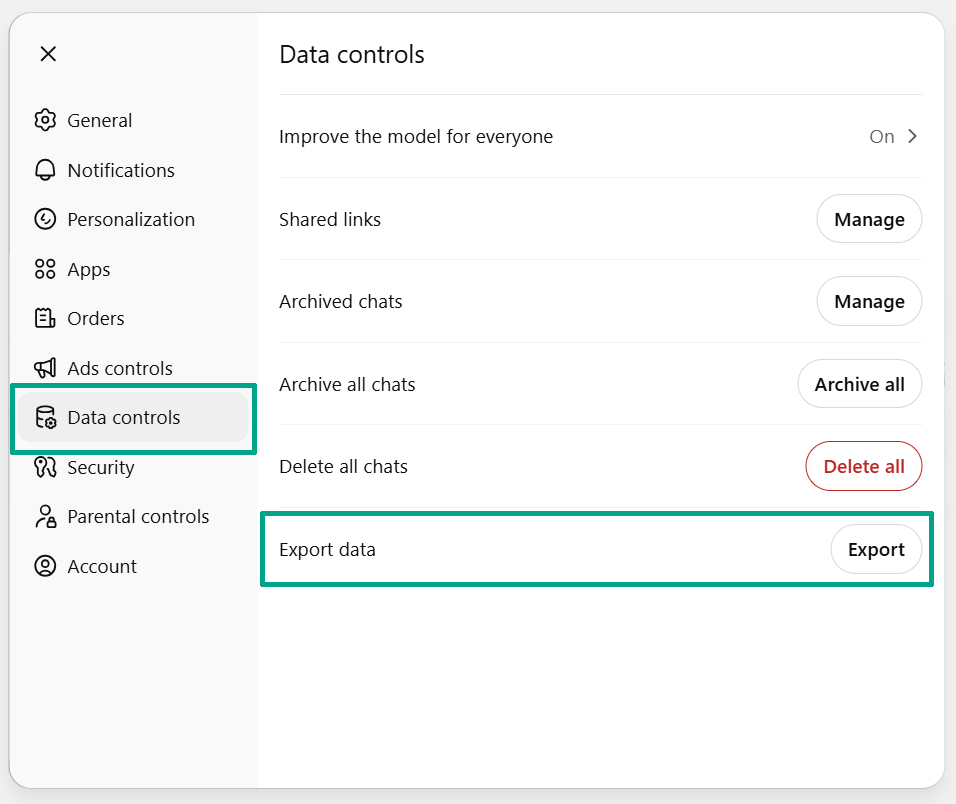
Drop Your ChatGPT Export Zip File
Have your ChatGPT export ready? Drop it here to get started.
Drop your ChatGPT export here
Accepts .zip or conversations.json — click or drag & drop
Your data is processed entirely in your browser. Nothing is uploaded to any server.
Why People Are Switching
More and more people are discovering that Claude offers a different — and for many, better — AI experience.
Anthropic was founded on the belief that AI should be safe, transparent, and built to protect people — not exploit them.
Claude handles long-form content better, follows complex instructions more faithfully, and gives more nuanced, thoughtful responses.
From coding and analysis to writing and research, Claude excels at the tasks you actually need help with every day.
Claude is designed to be helpful, harmless, and honest. It will tell you when it's unsure rather than making things up.